
Developer Guides
Token balances and fees
Why wallets show a placeholder balance on NVNM Chain, how fees are paid in nUSD, and how to read balances and send TIP-20 transfers from your dApp.
NVNM Chain NEXT is an L1 forked from Tempo. Like Tempo, it has no native gas token. You pay fees in a USD-denominated TIP-20 stablecoin, and on NVNM Chain the default fee token is nUSD. This guide explains what that means for balances, how Tempo's fee mechanism works, and how to read and transfer nUSD from a dApp.
Try it in the demo dApp
Open the NVNM demo dApp and use the Send nUSD card to see your nUSD balance and send a transfer. The TypeScript samples on this page come from the demo dApp's source (NVNM-Chain/nvnm-demo-dapp on GitHub).
Before you start:
- Add the network to your wallet. Enter the values from Network details, or open the NVNM demo dApp and connect your wallet. The dApp prompts your wallet to add the chain.
- Get nUSD from the faucet for Testnet or Devnet.
There is no native token
Tempo's docs put it plainly: "Remember that on Tempo, there is no native gas token." NVNM Chain inherits this. There is no ETH-like coin, and every amount you care about lives in a TIP-20 token.
Why your wallet shows a huge balance
Wallets still assume every chain has a native coin. To show it, they call the eth_getBalance RPC method. Tempo's docs explain what happens next:
When a wallet calls this method, it expects a hex string representing the "native token balance", hard-coded to be represented as an 18-decimal place number.
On Tempo, the
eth_getBalancemethod returns a hex string representing an extremely large number. Specifically it returns:0x9612084f0316e0ebd5182f398e5195a51b5ca47667d4c9b26c9b26c9b26c9b2which is represented in decimals as 4.242424242424242e+75.
That placeholder is why wallets show a number such as 4,242,424,2… next to USD or nUSD:
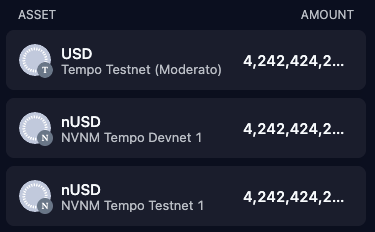
This is not your balance
The number is a placeholder, not money you can spend. As Tempo's connection guide says: "On Tempo, there is no native gas token, and so the value shown is a placeholder." The symbol next to it (USD or nUSD) comes from the network settings in your wallet. Your real balance is your nUSD TIP-20 balance.
You can see the placeholder yourself. Any address returns the same value:
curl -s -X POST -H 'content-type: application/json' \
  --data '{"jsonrpc":"2.0","id":1,"method":"eth_getBalance","params":["0x000000000000000000000000000000000000dEaD","latest"]}' \
  https://rpc.nvnm.testnet.nvnmchain.io
# {"jsonrpc":"2.0","id":1,"result":"0x9612084f0316e0ebd5182f398e5195a51b5ca47667d4c9b26c9b26c9b26c9b2"}In testnet, eth_getBalance returns a large placeholder value for the native token balance to unblock existing assumptions wallets have about the native token balance. Tempo also notes that wallets which check a native balance first may show "an error message like 'Insufficient balance'". The curl output above shows that NVNM Chain Testnet returns the same value.
What we recommend
- Don't check or show a native balance. If your app checks
eth_getBalance, remove that check. Don't show any "native balance" in your UI. - Check the fee token balance instead. If you use
eth_getBalanceto validate a user's balance, you should instead check the user's account fee token balance on NVNM Chain. - Use
USDas the currency symbol when a wallet needs one.
Inside the EVM, native balances are always zero:
| Feature | Behavior on Tempo | Alternative |
|---|---|---|
BALANCE and SELFBALANCE | Always returns 0 | Use TIP-20 balanceOf instead |
CALLVALUE | Always returns 0 | There is no alternative |
Learn more in the Tempo docs: EVM differences and wallet developer guide.
Add the network to a wallet
The demo dApp's chain config uses nUSD's 6 decimals as nativeCurrency (see Display the nUSD balance). MetaMask, however, rejects wallet_addEthereumChain unless nativeCurrency.decimals is 18. The demo dApp keeps a separate wallet-facing currency for that case:
// The native currency as wallets are told it when a network is added. It only describes the chain to
// the wallet; amounts are always read from the 6-decimal TIP-20 token.
export const walletNativeCurrency = { name: nUSD.name, symbol: nUSD.symbol, decimals: 18 } as const;View on GitHub: apps/web/src/config/chains.ts
Tempo recommends the symbol USD. The demo dApp uses nUSD instead, to match NVNM Chain's fee token name. Either way, the label is cosmetic.
Pass it when you switch networks. This excerpt is from the network picker. switchChain comes from wagmi's useSwitchChain, and c is the chain the user clicked, one of the chains from wagmi's useChains:
// ...
const switchChain = useSwitchChain();
// ...
switchChain.mutate({
  chainId: c.id,
  addEthereumChainParameter: { nativeCurrency: walletNativeCurrency },
});
// ...View on GitHub: apps/web/src/components/account-dialog.tsx
The wallet then labels the placeholder from eth_getBalance as nUSD. Always read amounts from the TIP-20 token.
How fees work
From Tempo's fee overview: "Tempo has no native token. Instead, transaction fees—including both gas fees and priority fees—can be paid directly in stablecoins." For a stablecoin to be accepted as a fee token, "it must be USD-denominated, issued as a native TIP-20 contract, and have sufficient liquidity on the native Fee AMM."
On NVNM Chain, the default fee token is nUSD, a TIP-20 at 0x20C0000000000000000000000000000000000000 with 6 decimals. The demo dApp calls it "the default fee token". Your nUSD balance covers both what you send and the fee.
Note
Tempo's docs use pathUSD, USDG, AlphaUSD and other tokens in their examples. On NVNM Chain, use nUSD at 0x20C0000000000000000000000000000000000000. It is the same token at the same address on Testnet and Devnet.
Fee units
Tempo uses a bounded dynamic base fee: "It can fall when block gas usage is below target and rise back toward the cap when the network is busy." All fees go to the validator who proposes the block.
Fees are priced in attodollars (10^-18 USD) per gas. From the fee specification:
Fees in the
max_base_fee_per_gasandmax_fee_per_gasfields of transactions, as well as in the block'sbase_fee_per_gasfield, are specified in attodollars (10^-18 USD) per gas. Since TIP-20 tokens have 6 decimal places — where 1 token unit = 1 microdollar (10^-6 USD) — the fee for a transaction can be calculated asceil(base_fee * gas_used / 10^12).
Tempo also charges more for creating state than Ethereum does. Per Tempo, "transfers to new addresses cost ~300k gas, and contract deployments cost 5-10x more than on Ethereum." Set your gas limits with that in mind.
Which token pays the fee
Tempo picks the fee token for each transaction by checking five levels, in this order:
- Transaction: the
fee_tokenfield of a Tempo Transaction (type0x76). This "overrides any preferences set at the account, contract, or validator level." - Account: a default the fee payer sets by calling
setUserTokenon the FeeManager precompile (0xfeec000000000000000000000000000000000000). - TIP-20 contract: if the top-level call is
transfer,transferWithMemoorstartRewardon a USD TIP-20 token, that token pays the fee. For Tempo Transactions, this applies only if all top-level calls go to the same TIP-20 contract using these functions, and the fee payer is the sender. - Stablecoin DEX: for certain swap calls, the
tokenInargument pays the fee. - pathUSD: the fallback.
The protocol stops at the first level that sets a token. At that level, it checks that the token is a USD TIP-20, that the user can cover the gas limit at the transaction's gas price, and that the Fee AMM has enough liquidity. If any check fails, the transaction is invalid.
On Tempo, pathUSD is the token at the predeployed address 0x20c0000000000000000000000000000000000000. On NVNM Chain, that address holds nUSD. In practice:
- A nUSD transfer pays its fee in nUSD through the TIP-20 contract rule.
- A call to any other contract, such as your own smart contract, uses the fallback unless the transaction sets
fee_tokenor the fee payer has set an account fee token withsetUserToken. The demo dApp sets neither. Its chain config notes that, unset, "the chain charges nUSD."
The full amount reaches the recipient
When you transfer the token that also pays the fee, Tempo sends the amount in full. Per Tempo: "the full amount of the token will be transferred and the sender's balance will be reduced by the amount spent in fees." So keep a little nUSD back for the fee.
Fee lifecycle
The FeeManager precompile collects and settles every fee:
User submits the transaction
The transaction carries the fee token chosen by the preference order above.
FeeManager collects the maximum fee
Before execution, the FeeManager checks your fee token balance and the Fee AMM liquidity (if a conversion is needed). It then collects the maximum fee, gas_limit * gas_price. If either check fails, the transaction is rejected before it runs.
Transaction executes
The transaction runs normally. It may use less gas than the maximum that was collected.
FeeManager refunds unused gas
The FeeManager computes the actual fee from the gas used and refunds the rest, (gas_limit - gas_used) * gas_price, to the fee payer.
Fee AMM converts the fee if needed
If your fee token differs from the validator's preferred token, the Fee AMM swaps it at a fixed rate of 0.9970 (the validator receives 0.9970 of their token per 1.0 of yours). If the tokens match, no conversion happens. Fees accumulate in the FeeManager, and validators claim them with distributeFees().
The Fee AMM is a protocol-run market for converting fees between stablecoins. Tempo describes it as "protocol-driven: it converts transaction-fee payments into validators' preferred tokens at a fixed price, and only the protocol (and arbitrageurs rebalancing it) swaps against it — it is not a trading venue." Liquidity providers earn the 0.3% difference.
Learn more in the Tempo docs: Fees, fee specification and Fee AMM.
Choosing a fee token and sponsoring fees
Tempo offers these options for fee setup:
| Goal | Tempo approach |
|---|---|
| Choose the fee token for one transaction | Pass feeToken |
| Set an account's persistent default fee token | Call setUserToken on the FeeManager |
| Have another account pay the fee | Pass the account as feePayer |
Fee sponsorship uses the fee_payer_signature field of Tempo Transactions. Per Tempo, the sender signs "over a blank fee token field", which delegates the fee token choice to the fee payer. "If no fee_payer_signature is provided, then the fee_payer of the transaction is its sender." The fee token "cannot be set from Solidity — it is a transaction-level parameter handled by the signing SDK."
Browser wallets and feeToken
The demo dApp leaves feeToken unset on purpose. Its chain config explains: "A fee token in a request makes viem send browser wallets a 0x76 transaction, which MetaMask can't sign." Leave feeToken unset when your users sign with MetaMask or similar wallets. The demo dApp doesn't use setUserToken or fee sponsorship.
Learn more in the Tempo docs: Pay fees in any stablecoin.
TIP-20 basics
Per Tempo, "TIP-20 tokens are a suite of precompiles that provide a built-in optimized token implementation in the core protocol. They extend the ERC-20 token standard with built-in functionality like memo fields and transfer policies." Only TIP-20 tokens can pay fees, and only those whose currency is "USD".
You need these functions to show balances and send tokens:
| Function | Notes |
|---|---|
balanceOf(address account) returns (uint256) | The account's balance in base units |
decimals() returns (uint8) | Always returns 6 for TIP-20 tokens |
transfer(address to, uint256 amount) returns (bool) | Same as ERC-20 |
transferWithMemo(address to, uint256 amount, bytes32 memo) | Like transfer, plus a fixed 32-byte memo emitted in a dedicated event |
Note
TIP-20 tokens reject some recipients. Per Tempo, a transfer to the zero address or to any TIP-20 token address (prefix 0x20c000000000000000000000) "must revert with InvalidRecipient." That includes nUSD's own address.
Learn more in the Tempo docs: TIP-20 specification.
Display the nUSD balance
The demo dApp never reads eth_getBalance. It reads nUSD's balanceOf and formats it with 6 decimals.
Define the fee token
Keep nUSD's address, symbol and decimals in one place. Later in the same file, each chain definition sets nativeCurrency: nUSD, so the chain's native currency also has 6 decimals.
// The default fee token: a TIP-20 precompile, read and transferred like an ERC-20 (see `src/lib/tip20.ts`).
export const nUSD = {
  name: "NVNM USD",
  symbol: "nUSD",
  decimals: 6,
  address: "0x20C0000000000000000000000000000000000000",
} as const;View on GitHub: apps/web/src/config/chains.ts
Declare a minimal TIP-20 ABI
TIP-20 is ERC-20 compatible for these calls. The two revert errors let viem decode a failed transfer.
import { parseAbi } from "viem";

// TIP-20 tokens are ERC-20 compatible for these calls. The functions mirror the faucet's `lib/tip20.ts`
// (https://github.com/NVNM-Chain/nvnm-tempo-devnet-faucet). Token metadata lives in `src/config/chains.ts`.
export const tip20Abi = parseAbi([
  "function transfer(address to, uint256 amount) returns (bool)",
  "function balanceOf(address account) view returns (uint256)",
  // How a transfer reverts. Declared so viem decodes the revert data when a wallet passes on only that, not the node's
  // message; `src/lib/wallet-errors.ts` maps both by name.
  "error InsufficientBalance(uint256 available, uint256 required, address token)",
  "error InvalidRecipient()",
]);View on GitHub: apps/web/src/lib/tip20.ts
Read the balance
Call balanceOf with wagmi's useReadContract. The hook polls every 4 seconds so faucet top-ups and incoming transfers show up.
import type { Address } from "viem";
import { useReadContract } from "wagmi";

import { nUSD } from "@/config/chains";
import type { SupportedChainId } from "@/config/wagmi";
import { tip20Abi } from "@/lib/tip20";

// The account's spendable nUSD, in base units. `eth_getBalance` is a placeholder on Tempo; the balance that pays for
// transfers and fees is the TIP-20 fee token's. Every caller passes the same query options, so wagmi runs one query
// per account and chain however many components show the balance. Render the result with `<NusdAmount>`.
export function useNusdBalance(account: Address, chainId: SupportedChainId) {
  return useReadContract({
    address: nUSD.address,
    abi: tip20Abi,
    functionName: "balanceOf",
    args: [account],
    chainId,
    // Poll (rather than `watch`) so faucet top-ups and incoming transfers show up; see network-status.tsx.
    query: { refetchInterval: 4_000, retry: 1 },
  });
}View on GitHub: apps/web/src/hooks/use-nusd-balance.ts
Parse and format amounts
Always use the token's 6 decimals, never 18. parseTokenAmount rejects extra decimals instead of rounding, so you never send a different amount than the user typed.
import { formatUnits, parseUnits } from "viem";

const DECIMAL = /^(\d+\.?\d*|\.\d+)$/;

export type ParsedAmount = { value: bigint } | { error: string };

// Parse user input into base units. Rejects rather than rounds extra decimals: viem's `parseUnits` rounds,
// which would send an amount other than the one typed.
export function parseTokenAmount(input: string, decimals: number): ParsedAmount {
  const text = input.trim();
  if (!DECIMAL.test(text)) return { error: "Enter an amount like 10 or 0.5." };
  if ((text.split(".")[1] ?? "").length > decimals) {
    return { error: `Use at most ${decimals} decimal places.` };
  }

  const value = parseUnits(text, decimals);
  return value > 0n ? { value } : { error: "Enter an amount above 0." };
}

const grouped = new Intl.NumberFormat("en-US", { maximumFractionDigits: 20 });

// `Intl.NumberFormat` formats decimal strings exactly, so no precision is lost to `Number`.
export function formatTokenAmount(value: bigint, decimals: number): string {
  return grouped.format(formatUnits(value, decimals) as `${number}`);
}View on GitHub: apps/web/src/lib/token-amount.ts
Render the balance
Check for errors first. A failed refetch keeps the last value, which would otherwise show a stale balance as current.
import { nUSD } from "@/config/chains";
import type { useNusdBalance } from "@/hooks/use-nusd-balance";
import { formatTokenAmount } from "@/lib/token-amount";

type NusdBalance = Pick<ReturnType<typeof useNusdBalance>, "data" | "isError">;

// A `useNusdBalance` result as text. Error first: a failed refetch keeps the last `data`, which would pass a stale
// balance off as current.
export function NusdAmount({ balance }: { balance: NusdBalance }) {
  if (balance.isError) return "Unavailable";
  if (balance.data === undefined) return "…";
  return (
    <>
      {formatTokenAmount(balance.data, nUSD.decimals)}{" "}
      <span className="text-base text-muted-foreground">{nUSD.symbol}</span>
    </>
  );
}View on GitHub: apps/web/src/components/nusd-amount.tsx
Transfer nUSD
A nUSD transfer is a plain TIP-20 transfer call. Because the top-level call is transfer on a USD TIP-20, Tempo's fee rules make nUSD pay the fee too.
Send the transfer
The demo dApp's Send nUSD card validates the recipient and amount, and rejects amounts above the balance. It calls transfer with wagmi's useWriteContract, then tracks the result with the dApp's useTxOutcome hook:
function TransferForm({ account, chain }: { account: Address; chain: SupportedChain }) {
  // ...
  // Shares the query the account dialog runs for the same account and chain.
  const balance = useNusdBalance(account, chain.id);
  const transfer = useWriteContract();
  // Shares the queries TxResultDialog runs for the same hash.
  const outcome = useTxOutcome(transfer.data, chain.id);

  const recipientError =
    recipient && !isAddress(recipient)
      ? "Enter a valid 0x address. Mixed-case addresses must match their checksum."
      : undefined;
  const parsed = amountText ? parseTokenAmount(amountText, nUSD.decimals) : undefined;
  const amount = parsed && "value" in parsed ? parsed.value : undefined;
  const amountError =
    parsed && "error" in parsed
      ? parsed.error
      : amount !== undefined && balance.data !== undefined && amount > balance.data
        ? "That's more than your balance."
        : undefined;
  const ready = isAddress(recipient) && amount !== undefined && !amountError;

  function submit(event: SubmitEvent) {
    event.preventDefault();
    if (!isAddress(recipient) || amount === undefined || amountError) return;
    transfer.mutate(
      {
        address: nUSD.address,
        abi: tip20Abi,
        functionName: "transfer",
        args: [recipient, amount],
        chainId: chain.id,
      },
      { onSuccess: () => setResultOpen(true) },
    );
  }
  // ...
}View on GitHub: apps/web/src/components/token-transfer.tsx
The card also tells users why the fee comes out of their nUSD. Under the amount field, it shows: "The fee comes out of your nUSD too, so keep a little back." Its info box reads:
NVNM Chain has no native coin like ETH. Network fees are paid in nUSD, a dollar stablecoin, so your nUSD balance covers both what you send and the fee. If your wallet shows a separate native balance, ignore it: it's a placeholder.
Note
wagmi's waitForTransactionReceipt throws when a transaction reverts, rather than returning a reverted receipt. To tell a revert from an RPC error, useTxOutcome fetches the receipt itself after a failed wait. Deploy and interact with smart contracts walks through the hook.
Map fee and transfer errors
Show users a clear message when they can't cover the amount plus the fee. The demo dApp maps wallet and TIP-20 errors by error name or by the text of the node's message. For TIP-20 reverts, revertedWith also matches the custom error name once viem decodes the revert data with tip20Abi. This excerpt shows the fee and transfer entries:
const known: [matches: (error: ErrorLike) => boolean, message: string][] = [
  // ...
  [
    (e) =>
      e.name === "InsufficientFundsError" || messageOf(e).includes("insufficient funds for gas"),
    `Not enough ${nUSD.symbol} to pay the network fee.`,
  ],
  // TIP-20 reverts, named in the node's message and, once viem decodes the revert data with `tip20Abi`, in viem's.
  [
    (e) => revertedWith(e, "InsufficientBalance") || messageOf(e).includes("InsufficientBalance"),
    `Not enough ${nUSD.symbol} for this amount plus the network fee.`,
  ],
  [
    // The zero address and TIP-20 token addresses (nUSD's own included) can't receive tokens.
    (e) => revertedWith(e, "InvalidRecipient") || messageOf(e).includes("InvalidRecipient"),
    `This address can't receive ${nUSD.symbol}. Check the recipient.`,
  ],
  // ...
];View on GitHub: apps/web/src/lib/wallet-errors.ts