
Developer Guides
Build passkey wallets
Create NVNM Chain accounts from passkeys, store and restore them, and sign transactions with Face ID, Touch ID, a security key or supported password managers, using Tempo's native WebAuthn/P256 (aka secp256r1) support.
NVNM Chain NEXT is an L1 forked from Tempo. Tempo verifies passkey (WebAuthn/P256) signatures in the protocol itself, so you can turn a passkey into an account without a smart-contract wallet, bundler or seed phrase.
This guide explains how NVNM Chain supports passkeys. It then walks through the passkey wallet in the NVNM demo dApp. You learn how to create an account, store its public key, restore it in a new browser and sign transactions.
Live demo and source
The live NVNM demo dApp runs the passkey wallet this page describes. The dApp code samples on this page come from the demo dApp's source (NVNM-Chain/nvnm-demo-dapp on GitHub). File paths such as apps/web/src/config/chains.ts are relative to that repository. For a click-through, see Try it in the demo dApp.
How passkeys work on the chain
Tempo's docs explain why passkeys need protocol support:
Current accounts are limited to secp256k1 signatures and sequential nonces, creating UX and scalability challenges. Users cannot leverage modern authentication methods like passkeys, applications face throughput limitations due to sequential nonces.
Tempo solves this with Tempo Transactions, "a new EIP-2718 transaction type" with type byte 0x76. The first native feature the Tempo Transaction specification lists is "WebAuthn/P256 signature validation - enables passkey signing". Tempo sums up what this means for wallets:
Tempo Transactions natively support secp256k1, P256, and WebAuthn signatures. The protocol verifies these signatures directly, so passkey authentication works without custom contracts.
The demo dApp describes its passkey account the same way: "a chain-native WebAuthn P-256 account" (apps/web/README.md).
Signature types
"Four signature schemes are supported. The signature type is determined by length and type identifier" (specification). The spec also notes: "Different signature types incur different base transaction costs to reflect their computational complexity." The last column shows that base transaction cost, not the cost of the signature check alone. The secp256k1 base of 21,000 "Includes 3,000 gas for ecrecover precompile", and P256 adds "additional 5k for P256 verification":
| Type | Wire format | How Tempo verifies it | Base transaction gas |
|---|---|---|---|
| secp256k1 | 65 bytes, no type prefix (backward compatible) | Standard ecrecover | 21,000 |
| P256 | Prefix 0x01 + 129 bytes (r, s, pub_key_x, pub_key_y, pre_hash). 130 bytes total. | P256 curve verification with the provided public key. If pre_hash is true, the digest is sha256(digest) first. | 26,000 |
| WebAuthn | Prefix 0x02 + webauthn_data (authenticatorData ‖ clientDataJSON) + 128 bytes (r, s, pub_key_x, pub_key_y). 129 to 2049 bytes. | Parse clientDataJSON, verify challenge and type, then P256 verify | 26,000 + calldata gas for clientDataJSON |
| Keychain | Prefix 0x03 + user_address (20 bytes) + inner signature | Verify the inner signature, then validate the access key in the AccountKeychain precompile | Inner signature + 3,000 |
A passkey produces a WebAuthn signature. Tempo's WebAuthn struct looks like this:
pub struct WebAuthnSignature {
    typeId: u8,                 // 0x02
    webauthn_data: Bytes,       // Variable length (authenticatorData || clientDataJSON)
    r: B256,                    // 32 bytes
    s: B256,                    // 32 bytes
    pub_key_x: B256,            // 32 bytes
    pub_key_y: B256             // 32 bytes
}Source: Tempo Transaction specification.
Tempo also advises: "For TempoTransactions, wallets should send minimal authenticatorData (37 bytes, no AT/ED flags) to minimize gas costs and simplify parsing."
How a passkey becomes an address
For P256 and WebAuthn keys, Tempo derives the address from the public key alone:
function deriveAddressFromP256(bytes32 pubKeyX, bytes32 pubKeyY) public pure returns (address) {
    // Hash
    bytes32 hash = keccak256(abi.encodePacked(
        pubKeyX,
        pubKeyY
    ));

    // Take last 20 bytes as address
    return address(uint160(uint256(hash)));
}Source: Tempo Transaction specification.
Two consequences follow for your app:
- You must keep the public key. Tempo's viem guide warns you to store it: "A passkey only stores its credential id on the device, not the public key. Because the account address is derived from the public key, you must store it yourself (in a database or local storage) when the credential is created, then resolve it via
getPublicKeywhen restoring" (viem: Sign in with a passkey). - One passkey is one account. The formula takes no chain ID. The demo dApp tells its users: "Your address comes from the passkey, so creating another makes a new, empty account... It's the same address on testnet and devnet, with a separate balance on each."
What the chain checks, and what it skips
Tempo's WebAuthn verification follows the Daimo P256 verifier approach. The challenge is the transaction hash, Base64URL-encoded, and the signed message is sha256(authenticatorData || sha256(clientDataJSON)).
| Tempo verifies | Tempo skips |
|---|---|
| Authenticator data minimum length (37 bytes) | Origin verification (not applicable to blockchain) |
| User Presence (UP) flag is set | RP ID hash validation (no central RP in decentralized context) |
"type":"webauthn.get" in clientDataJSON | Signature counter (anti-cloning left to application layer) |
Challenge matches tx_hash (Base64URL encoded) | Backup flags (account policy decision) |
| P256 signature validity |
Because the chain skips origin and RP ID checks, the chain does not bind a passkey to your domain. The browser does. Keep this in mind when you read the security notes.
Passkey prompts and access keys
With a passkey as the root key, every signature needs a passkey prompt. Tempo's Account Keychain specification says:
for an Account using a Passkey as its Root Key, the sender will subsequently be prompted with passkey prompts for every signature request. This can be a poor user experience for highly interactive or multi-step flows. Additionally, users would also see "Sign In" copy in prompts for signing transactions which is confusing.
Tempo's answer is access keys. The same page introduces "the Root Key being able to provision a scoped Access Key that can be used for subsequent transactions, without the need for repetitive end-user prompting." The AccountKeychain precompile at 0xAAAAAAAA00000000000000000000000000000000 manages them. Note one restriction: "Access-key-signed transactions cannot perform CREATE or CREATE2, including via factory contracts. Use a Root Key for deployments."
Note
The demo dApp keeps access keys off. Every transaction asks for the passkey, and its UI warns users that "your device's prompt may say 'Sign in'". To add access keys, see Tempo's Access Keys guide.
The SDKs to use
The demo dApp builds its passkey wallet on three TypeScript packages that carry Tempo support. Tempo's TypeScript SDK page links to the viem and wagmi integrations:
| Package | Role | Version in the demo dApp |
|---|---|---|
wagmi (wagmi/tempo) | The webAuthn connector, "Connector for a WebAuthn EOA" (wagmi.sh/tempo) | wagmi 3.7.7, @wagmi/core 3.6.5 |
accounts | The Tempo Accounts SDK. "webAuthn is a thin wagmi wrapper around the root accounts package." | 0.18.4 |
viem (viem/tempo) | Tempo chain config, Account.fromWebAuthnP256 and the Tempo transaction serializers | ^2.57.1 (2.57.1 resolved) |
The demo dApp's passkey ceremony also uses ox 0.14.45 and webauthx 0.1.2, the versions accounts 0.18.4 resolves. Its pnpm-workspace.yaml pins wagmi, @wagmi/core, accounts, ox and webauthx to exact versions (viem is ^2.57.1), so re-test before you bump them.
Tempo's minimal setup registers the connector in a wagmi config:
import { createConfig, http } from 'wagmi'
import { tempo } from 'wagmi/chains'
import { webAuthn } from 'wagmi/tempo'

export const config = createConfig({
  connectors: [webAuthn()],
  chains: [tempo],
  multiInjectedProviderDiscovery: false,
  transports: {
    [tempo.id]: http(),
  },
})Source: wagmi.sh/tempo.
By default the connector runs the passkey ceremony in the browser. Tempo says: "Use webAuthn({ authUrl: '/api/webauthn' }) if you want registration and authentication challenges to come from a server endpoint instead of the default local browser ceremony." To plug in your own ceremony, pass ceremony. The demo dApp does this.
Info
Tempo's Accounts SDK docs recommend Tempo Wallet for most apps, and "domain-bound passkeys when you want to build your own wallet experience or when your app needs to manage and own the WebAuthn ceremony directly" (FAQ). This guide covers the domain-bound option, which the demo dApp uses.
Build the passkey wallet
The steps below follow the demo dApp's web app in apps/web. It is a React app with wagmi and Reown AppKit.
Add Tempo's chain config to the NVNM chains
NVNM chains aren't built into viem, so the dApp defines them with defineChain. Passkey accounts send Tempo transactions (type 0x76), so each chain also needs Tempo's formatters and serializers. The dApp copies exactly those keys from viem's tempoModerato chain:
import { defineChain, type Address, type Hash } from "viem";
import { tempoModerato } from "viem/tempo/chains";

// ...

// Passkey (Tempo) accounts need Tempo's chain config: the formatters, serializers and prepare hook for its native
// transaction type (0x76), plus the signature-envelope `verifyHash`. Their requests carry Tempo `calls`, which
// viem's default formatter drops. viem doesn't export the config on its own, so take exactly these keys off a
// Tempo chain (the whole chain would bring Tempo's contracts and hardfork). Tempo's `blockTime` (1 s) puts viem's
// default polling at its 500 ms floor, which suits NVNM Chain's ~0.5 s blocks.
//
// ...
//
// `feeToken` and `hardfork` stay unset on purpose. A fee token in a request makes viem send browser wallets a 0x76
// transaction, which MetaMask can't sign; on the chain it turns their gas estimates into 0x76. Unset, the chain
// charges nUSD. NVNM Chain runs Tempo forks up to t11/t12, past viem's list (t6), and viem treats a fork it doesn't
// know as older than all of them; unset, it assumes the current rules.
const { blockTime, extendSchema, formatters, prepareTransactionRequest, serializers, verifyHash } =
  tempoModerato;
const tempoChainConfig = {
  blockTime,
  extendSchema,
  formatters,
  prepareTransactionRequest,
  serializers,
  verifyHash,
};

export const nvnmTestnet = defineChain({
  ...tempoChainConfig,
  id: 787_223,
  name: "NVNM Tempo Testnet 1",
  nativeCurrency: nUSD,
  rpcUrls: {
    default: {
      http: [import.meta.env.VITE_NVNM_TESTNET_RPC_URL || "https://rpc.nvnm.testnet.nvnmchain.io"],
      webSocket: ["wss://ws.nvnm.testnet.nvnmchain.io"],
    },
  },
  // ...
  testnet: true,
});View on GitHub: apps/web/src/config/chains.ts
The Devnet chain (787222) uses the same spread. See Network details for both networks.
Register the passkey connector
The dApp creates one webAuthn connector from wagmi/tempo. It gives the connector an IndexedDB storage adapter and a custom ceremony, and both share that same storage:
import { WagmiAdapter } from "@reown/appkit-adapter-wagmi";
import { Storage } from "accounts";
import { http, type Config, type Connector } from "wagmi";
import { webAuthn } from "wagmi/tempo";

import { recoveringCeremony } from "@/lib/passkey-ceremony";

import { nvnmDevnet, nvnmTestnet } from "./chains";
import { PASSKEY_RDNS, PASSKEY_STORAGE_KEY, WALLETCONNECT_PROJECT_ID } from "./constant";

const chains = [nvnmTestnet, nvnmDevnet] as const;

// ...

// Holds the passkey accounts and the public keys of passkeys used here (IndexedDB). The connector and the ceremony
// must share it: the next sign-in looks up the keys the ceremony recovers in it.
const passkeyStorage = Storage.idb({ key: PASSKEY_STORAGE_KEY });

// A chain-native account per passkey (WebAuthn P-256), verified by NVNM Chain itself. Every transaction asks for the
// passkey: no access keys, fee payer or relay.
const passkey = webAuthn({
  name: "Passkey",
  rdns: PASSKEY_RDNS,
  // Machine payments would replace `globalThis.fetch` to pay HTTP 402 responses from the passkey account.
  mpp: false,
  storage: passkeyStorage,
  // Signs in with passkeys this browser hasn't stored a key for (another device, cleared site data).
  ceremony: recoveringCeremony({ storage: passkeyStorage }),
});

export type PasskeyConnector = Connector<ReturnType<typeof webAuthn>>;

// Tells the passkey connector apart by type. That also works on the connector of the connection wagmi restores while
// it reconnects on load, but that one is a stub with only id, name, type and uid: call methods only on a connector
// from `useConnectors()`.
export function isPasskey(connector: Connector): connector is PasskeyConnector {
  return connector.type === webAuthn.type;
}

// Owns the wagmi config: the adapter builds it from these options (they're wagmi `createConfig` parameters) and adds
// AppKit's connectors — injected, EIP-6963 wallets and, with a project id, WalletConnect — at runtime.
export const wagmiAdapter = new NvnmWagmiAdapter({
  networks: [...chains],
  projectId: WALLETCONNECT_PROJECT_ID,
  connectors: [passkey],
  transports: {
    [nvnmTestnet.id]: http(),
    [nvnmDevnet.id]: http(),
  },
});View on GitHub: apps/web/src/config/wagmi.ts
recoveringCeremony is the dApp's own wrapper around the Accounts SDK's local ceremony. It lets users sign in from a browser that hasn't stored their key. See Restore an account in a new browser.
The two constants come from constant.ts:
// The passkey wallet's reverse-DNS id. The accounts SDK announces its provider over EIP-6963 under this id, and wagmi
// skips an announced wallet whose rdns matches a configured connector, so the passkey isn't listed twice.
export const PASSKEY_RDNS = "io.nvnmchain.demo.passkey";
// Prefix of the passkey wallet's keys in IndexedDB (the accounts SDK's `tempo` database): its accounts and the public
// keys of passkeys used on this site.
export const PASSKEY_STORAGE_KEY = "nvnm-demo-dapp";View on GitHub: apps/web/src/config/constant.ts
The dApp passes the connector to NvnmWagmiAdapter, its own subclass of Reown AppKit's WagmiAdapter. The adapter's options are wagmi createConfig parameters. If you don't use AppKit, pass the same connectors: [passkey] and transports to wagmi's createConfig, as in Tempo's minimal setup above. Then wrap your app in WagmiProvider and QueryClientProvider as usual (see apps/web/src/providers.tsx).
Create a passkey account
You create and sign in to passkey accounts through wagmi's useConnect. The capabilities you pass tell the Tempo Accounts SDK which WebAuthn ceremony to run. Tempo documents them on wallet_connect as "a discriminated union over method — 'register' or 'login'". The dApp's passkey view creates an account like this:
type Capabilities = NonNullable<Parameters<PasskeyConnector["connect"]>[0]>["capabilities"];

// ...

function PasskeyView({ onBack }: { onBack: () => void }) {
  // ...
  const passkey = useConnectors().find(isPasskey);
  // ...
  const connected = Boolean(useConnection().address);
  const connect = useConnect();
  const pending = connect.isPending;
  // The network the app is on, which the header's faucet link uses too. The passkey connects on it (the accounts
  // SDK would otherwise pick its own saved network), so the faucet linked below funds it where it lands.
  const chainId = useChainId();
  const error = walletErrorMessage(connect.error);

  // ...

  function connectPasskey(action: Action, capabilities: Capabilities) {
    if (!passkey || pending || connected) return;
    setStarted(action);
    connect.mutate({ connector: passkey, chainId, capabilities });
  }

  function create(event: SubmitEvent) {
    event.preventDefault();
    connectPasskey("create", { method: "register", name: name.trim() || APP_NAME });
  }

  // ...
}View on GitHub: apps/web/src/components/connect-dialog.tsx
The name labels the passkey. The dApp's form describes it as "Shown in your password manager". Pass chainId so the account connects on the network your app is on.
When you register, the Accounts SDK (accounts 0.18.4) does the following:
- It asks the ceremony for registration options. The ceremony uses the page's hostname as the relying party ID (
rpId). - It calls the browser's WebAuthn API, which prompts the user to create a passkey.
- The ceremony's
verifyRegistrationstores the new public key in itscredentialsmap. Account.fromWebAuthnP256({ id, publicKey })fromviem/tempoderives the account address.
Before you offer passkeys, check that the browser supports WebAuthn. The dApp disables the Passkey option otherwise:
const passkeysSupported = typeof window.PublicKeyCredential !== "undefined";View on GitHub: apps/web/src/components/connect-dialog.tsx
Sign in with an existing passkey
To sign in, the same view connects with the login method:
// `selectAccount` lets the browser offer every passkey saved for this site instead of the last one used.
const signIn = () => connectPasskey("signIn", { method: "login", selectAccount: true });View on GitHub: apps/web/src/components/connect-dialog.tsx
The SDK asks the browser for a passkey signature, then the ceremony's verifyAuthentication returns that passkey's public key, and the SDK derives the address from it. Without selectAccount, the SDK asks for the last passkey used, which it remembers as lastCredentialId.
Sign and send transactions
You don't need passkey-specific send code. Call the same wagmi hooks you use for browser wallets. The dApp's Send nUSD card sends a TIP-20 transfer like this:
const transfer = useWriteContract();

// ...

transfer.mutate(
  {
    address: nUSD.address,
    abi: tip20Abi,
    functionName: "transfer",
    args: [recipient, amount],
    chainId: chain.id,
  },
  { onSuccess: () => setResultOpen(true) },
);View on GitHub: apps/web/src/components/token-transfer.tsx
With the passkey connector active, the SDK builds a Tempo transaction (type 0x76). viem/tempo's Account.fromWebAuthnP256 passes the transaction hash to WebAuthn as the challenge, which matches Tempo's rule that the "Challenge matches tx_hash". The browser shows a passkey prompt for each transaction. Viem's guide puts it the same way: "The user is prompted to authorize with their passkey when the transaction is signed."
The dApp tracks the result with its useTxOutcome hook the same way for passkey accounts and browser wallets. See Deploy and interact with smart contracts.
Contract calls work the same way. See Deploy and interact with smart contracts for the CheckIn contract in the dApp's packages/contracts, and Token balances and fees for the transfer flow.
Show clear passkey errors
Passkey failures reach you wrapped by viem, wagmi and the Accounts SDK. A cancelled prompt isn't a 4001 rejection. The dApp walks the error's cause chain and maps the browser's WebAuthn error names to short messages:
// Checked against every error in the `cause` chain, outermost first. Wallet, passkey and RPC failures arrive wrapped
// by viem, wagmi and the passkey provider: a cancelled passkey prompt, for example, is an RPC -32603 error caused by
// the browser's `NotAllowedError`, not a 4001 rejection.
const known: [matches: (error: ErrorLike) => boolean, message: string][] = [
  [
    (e) => e.name === "NotAllowedError",
    // The browser uses one error for cancel, timeout and a failed biometric check.
    "The passkey request was cancelled or timed out.",
  ],
  [(e) => isRejection(e) && !isMisreported(e), "Request rejected in your wallet."],
  [
    (e) => messageOf(e).includes("Unknown credential"),
    "This passkey's account isn't known here yet. Try signing in again.",
  ],
  [
    // Thrown by the passkey ceremony when two signatures don't agree on one public key.
    (e) => e.name === "PasskeyRecoveryError",
    "Couldn't recover the account for this passkey.",
  ],
  [
    // Creating a passkey the authenticator already holds for this site.
    (e) => e.name === "InvalidStateError",
    "A passkey for this site already exists on this device. Sign in with it instead.",
  ],
  [
    (e) => e.name === "SecurityError",
    "Passkeys need a secure (https) page on the site's own domain.",
  ],
  [(e) => e.name === "NotSupportedError", "This browser doesn't support passkeys."],
  // ...
];View on GitHub: apps/web/src/lib/wallet-errors.ts
Tempo's production checklist gives the same advice: "Surface specific error messages for expired challenges, canceled prompts, and RP ID or origin mismatches so users (and support) can recover quickly" (production checklist).
Where the dApp stores passkey data
The dApp stores passkey data in IndexedDB, not localStorage. Storage.idb is the Accounts SDK's IndexedDB adapter. Tempo documents it as "the default storage for Provider.create in the browser" (Storage.idb).
The adapter writes to an IndexedDB database named tempo. It prefixes every key with options.key, which Tempo describes as "Useful when several apps share the same origin and you want to avoid key collisions."
With key: "nvnm-demo-dapp", the dApp's data lives under these keys:
| IndexedDB key | Written by | Contents |
|---|---|---|
nvnm-demo-dapp.credentials | The ceremony, on registration and recovery | A map from credential ID to the passkey's uncompressed P-256 public key (hex) |
nvnm-demo-dapp.lastCredentialId | The SDK's WebAuthn adapter, after create and sign-in | The ID of the last passkey used |
The SDK also persists its provider state, such as the connected accounts, through the same storage adapter.
Warning
The app never stores a private key. The authenticator holds it. The dApp stores only public keys and account metadata. Its UI says: "This site never sees its private key."
The key names come from the internals of accounts 0.18.4, which the dApp relies on. Tempo doesn't document them, so check them again when you upgrade the SDK.
Restore an account in a new browser
WebAuthn returns a passkey's public key only when the passkey is created. If a user signs in from another device with a synced passkey, or after clearing site data, the browser has no stored key. The SDK's local ceremony then fails with Unknown credential.
Tempo's guidance is to store the public key yourself, "in a database or local storage", and the Accounts SDK offers a server-backed ceremony for this. The demo dApp has no backend, so it uses its own technique instead. ECDSA public-key recovery yields two candidate public keys per signature. The dApp asks for a second signature from the same passkey, keeps the one key that both sets share, and stores it:
import { type Storage, WebAuthnCeremony } from "accounts";
import { Bytes, Hash, P256, PublicKey, Signature } from "ox";
import type { Hex } from "viem";
import { Authentication } from "webauthx/client";

// ...

// Where accounts 0.18.4's `WebAuthnCeremony.local` keeps its credential id → public key map (uncompressed P-256,
// hex). Recovered keys go into the same map, so the next sign-in on this device takes the local path.
const credentialsKey = "credentials";

// ...

// The accounts SDK's local ceremony, able to sign in with a passkey this browser has never seen.
//
// WebAuthn only returns a passkey's public key when it is created, and the local ceremony keeps it in this browser's
// storage, so a passkey synced to another device, or used after site data is cleared, fails with "Unknown credential".
// There is no backend to ask. Instead, ECDSA public-key recovery gives two candidate keys per signature; a second
// signature by the same passkey, over a fresh challenge, shares exactly one of them: the passkey's key.
export function recoveringCeremony({
  storage,
  rpId,
  sign = Authentication.sign,
}: RecoveringCeremonyOptions): Ceremony {
  const local = WebAuthnCeremony.local({ storage, rpId });
  // Candidates from a recovery whose second prompt failed, by credential id, so a retry needs a single prompt.
  const pending = new Map<string, readonly Hex[]>();

  async function storedKeys() {
    return (await storage.getItem<Record<string, Hex>>(credentialsKey)) ?? {};
  }

  async function remember(credentialId: string, publicKey: Hex) {
    await storage.setItem(credentialsKey, { ...(await storedKeys()), [credentialId]: publicKey });
    pending.delete(credentialId);
    return { credentialId, publicKey };
  }

  return WebAuthnCeremony.from({
    ...local,
    async verifyAuthentication(response) {
      // The local ceremony's `verifyAuthentication` is this lookup, but throws where an unknown key starts recovery. A
      // stored key must also have made this signature: any page on this origin can write the map, and a wrong entry
      // would otherwise give the wrong address on every sign-in. Recovery replaces it.
      const known = (await storedKeys())[response.id];
      if (known && signedBy(response, known))
        return { credentialId: response.id, publicKey: known };

      const candidates = recoverCandidates(response);
      const earlier = pending.get(response.id);
      const recovered = earlier && commonKey(earlier, candidates);
      if (recovered) return remember(response.id, recovered);

      // If this prompt is cancelled the error propagates and `pending` keeps these candidates.
      pending.set(response.id, candidates);
      const { options } = await local.getAuthenticationOptions({ credentialId: response.id });
      const second = await sign({ options });
      // From here a failure can't tell which signature was wrong, so a retry starts over.
      pending.delete(response.id);
      if (second.id !== response.id) {
        throw new PasskeyRecoveryError(
          `Expected a second signature from passkey ${response.id}, got one from ${second.id}.`,
        );
      }
      const publicKey = commonKey(candidates, recoverCandidates(second));
      if (!publicKey) {
        throw new PasskeyRecoveryError(
          `The two signatures from passkey ${response.id} don't share a public key.`,
        );
      }
      return remember(response.id, publicKey);
    },
  });
}

// What a WebAuthn authenticator signs: sha256(authenticatorData ‖ sha256(clientDataJSON)).
function signedPayload(response: AuthenticationResponse) {
  const { authenticatorData, clientDataJSON } = response.metadata;
  return Hash.sha256(
    Bytes.concat(Bytes.fromHex(authenticatorData), Hash.sha256(Bytes.fromString(clientDataJSON))),
  );
}

// ...

// The public keys that could have produced this assertion's signature, one per y-parity of the curve point R, in the
// format the SDK stores. Parities that don't yield a point are skipped.
function recoverCandidates(response: AuthenticationResponse): Hex[] {
  const payload = signedPayload(response);
  const { r, s } = Signature.fromHex(response.signature);
  const candidates: Hex[] = [];
  for (const yParity of [0, 1]) {
    try {
      candidates.push(
        PublicKey.toHex(P256.recoverPublicKey({ payload, signature: { r, s, yParity } })),
      );
    } catch {
      // No curve point for this parity.
    }
  }
  return candidates;
}

// The one key both candidate sets share. Two shared keys mean the second signature repeats the first (the same r and
// s, up to the sign of s, over the same payload), which doesn't single out a key, so that counts as no match.
function commonKey(a: readonly Hex[], b: readonly Hex[]): Hex | undefined {
  const common = a.filter((key) => b.includes(key));
  return common.length === 1 ? common[0] : undefined;
}View on GitHub: apps/web/src/lib/passkey-ceremony.ts
Here is what this means for your users:
- In a browser that already stores the key, sign-in takes one prompt. The ceremony still checks that the stored key made the signature, because "any page on this origin can write the map".
- In a new browser, sign-in takes two prompts. The dApp tells users: "In a browser you haven't used this passkey in, you'll confirm twice so we can recover your account."
- After recovery, the key is stored, so the next sign-in takes one prompt.
signedPayload computes the same message that Tempo's WebAuthn verifier checks: sha256(authenticatorData || clientDataHash).
Note
Two-signature recovery is the demo dApp's own approach, not a Tempo feature.
Use a server-backed ceremony in production
The SDK's source describes WebAuthnCeremony.local as "a pure client-side ceremony for development and prototyping". For production, Tempo documents a server-backed ceremony. Mount Handler.webAuthn from accounts/server. Then point the connector at it with webAuthn({ authUrl: '/auth' }):
import { Handler, Kv } from 'accounts/server'

export const handler = Handler.webAuthn({
  kv: Kv.memory(),
  origin: 'https://app.example.com',
  rpId: 'example.com',
})Tempo warns: "Kv.memory() is fine for local development and tests, but not for production. Use a persistent Kv adapter instead." Source: WebAuthn adapter guide.
Security and operational notes
Passkeys are bound to the domain
The browser binds every passkey to an RP ID. In the demo dApp, the RP ID is the page's hostname. Its README explains the consequences:
Passkeys are bound to the domain. A passkey belongs to the hostname it was created on, so production passkeys belong to
nvnm-chain.github.io, andlocalhost(dev andvp preview) has its own. Every NVNM-Chain GitHub Pages site shares that hostname and its storage: any of them can ask for these passkeys and, with the user's biometric, sign for their accounts, so only trusted repos should publish to the org's Pages. A custom domain avoids that, but moving the app to another domain orphans every existing passkey account: the passkey can't be used there, so the app can no longer sign for that address. Settle the domain before promoting passkeys.— Demo dApp
README.md
Tempo's Accounts SDK docs give the same warning about your choice of RP ID:
Choose
rpIdcarefully before you ship. If you register withrpId: 'example.com', that credential can be used fromapp.example.comand other subdomains that satisfy WebAuthn's RP rules. But the reverse is not true: a passkey created withrpId: 'app.example.com'cannot later be used withrpId: 'example.com'.
Tempo also says: "Treat rpId like part of your public API. Changing it later can strand existing credentials and force users to register new passkeys."
The browser enforces this binding. NVNM Chain doesn't.
Serve passkeys from a secure origin
- Tempo says: "WebAuthn requires a secure context outside of
localhost. Production passkey ceremonies will fail outright over HTTP." - In development, open your app at
localhost. The dApp's README warns: "an IP address such as127.0.0.1isn't a valid passkey domain, so passkeys fail there." localhostand your production host hold different passkeys, so they are different accounts.
Plan for lost passkeys
There is no seed phrase. The dApp warns its users: "If every copy of the passkey is lost or deleted, the account and its funds are gone. Passkeys synced by iCloud Keychain or Google Password Manager also work on your other devices signed in to the same Apple or Google account."
Tempo adds that "you should not assume every user has sync enabled or access to the same provider on every device. A user can also lose all registered authenticators at once." Tempo advises you to "Plan for multiple credentials per user from the start" (Account recovery).
Fund new accounts
A new passkey account is empty. The dApp tells users: "New passkey accounts start with 0 nUSD, and network fees are paid in nUSD." Point your users to a faucet:
- Testnet: nUSD faucet
- Devnet: nUSD faucet
The dApp uses nUSD, the TIP-20 at 0x20C0000000000000000000000000000000000000, as the fee token on both networks. To learn how fees work, see Token balances and fees. Check Network details for each faucet's current status.
Try it in the demo dApp
Open the passkey view
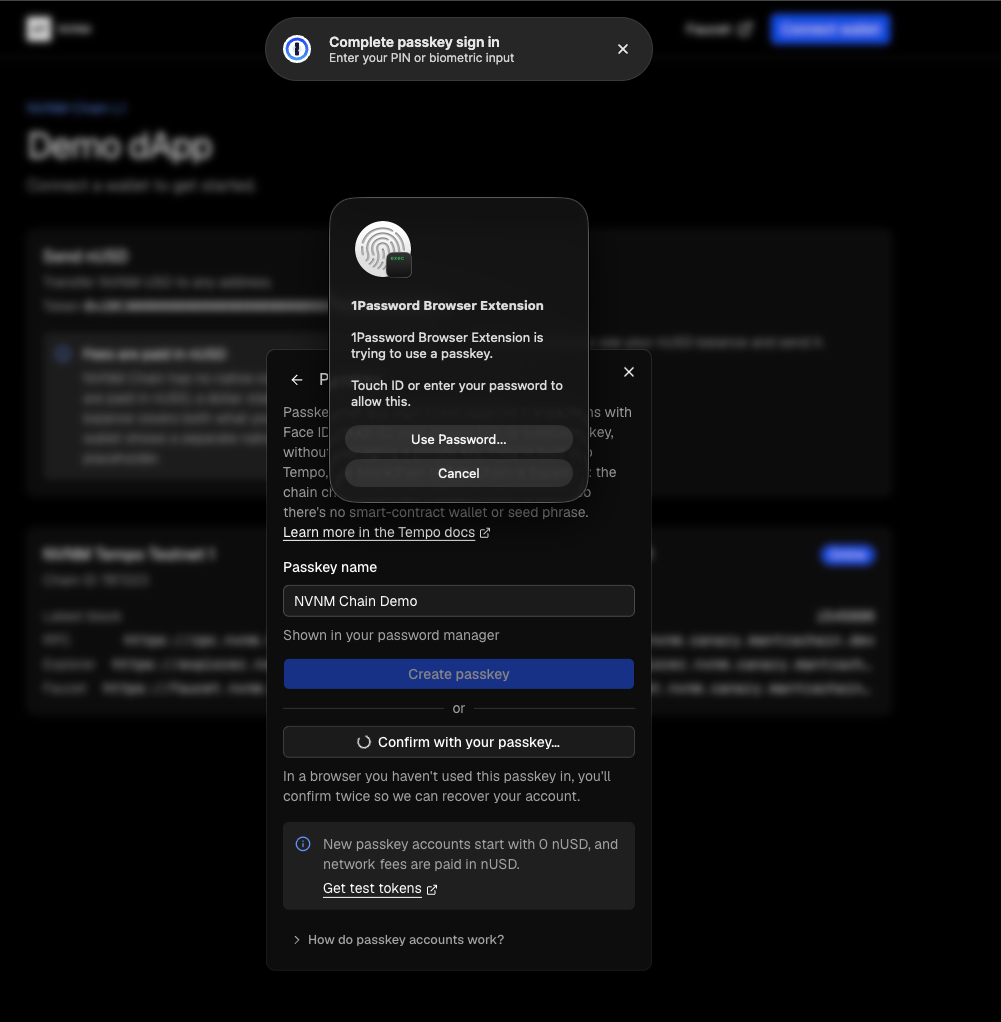
Open the NVNM demo dApp. Click Connect wallet, then click Passkey.
Create a passkey
Enter a Passkey name and click Create passkey. Confirm with Face ID, Touch ID, your screen lock or a security key.
Fund and use the account
Click Get test tokens in the passkey view to fund the account. Then send nUSD from the Send nUSD card. Your passkey approves each transaction.
Sign in again
Disconnect, then click Sign in with a passkey. Your browser or password manager asks you to confirm with your passkey. Open How do passkey accounts work? in the same view for a summary of how passkey accounts behave.
Learn more in the Tempo docs
- Tempo Transactions
- Tempo Transaction specification: signature types, address derivation and WebAuthn verification
- Account Keychain specification: access keys
- Tempo Transactions compared with EIP-4337
- Tempo TypeScript SDKs
- wagmi
webAuthnconnector - viem: Sign in with a passkey
- Tempo Accounts SDK: WebAuthn adapter
- Tempo Accounts SDK: production checklist